Field study: Prototypes over mockups
 Edouard Wautier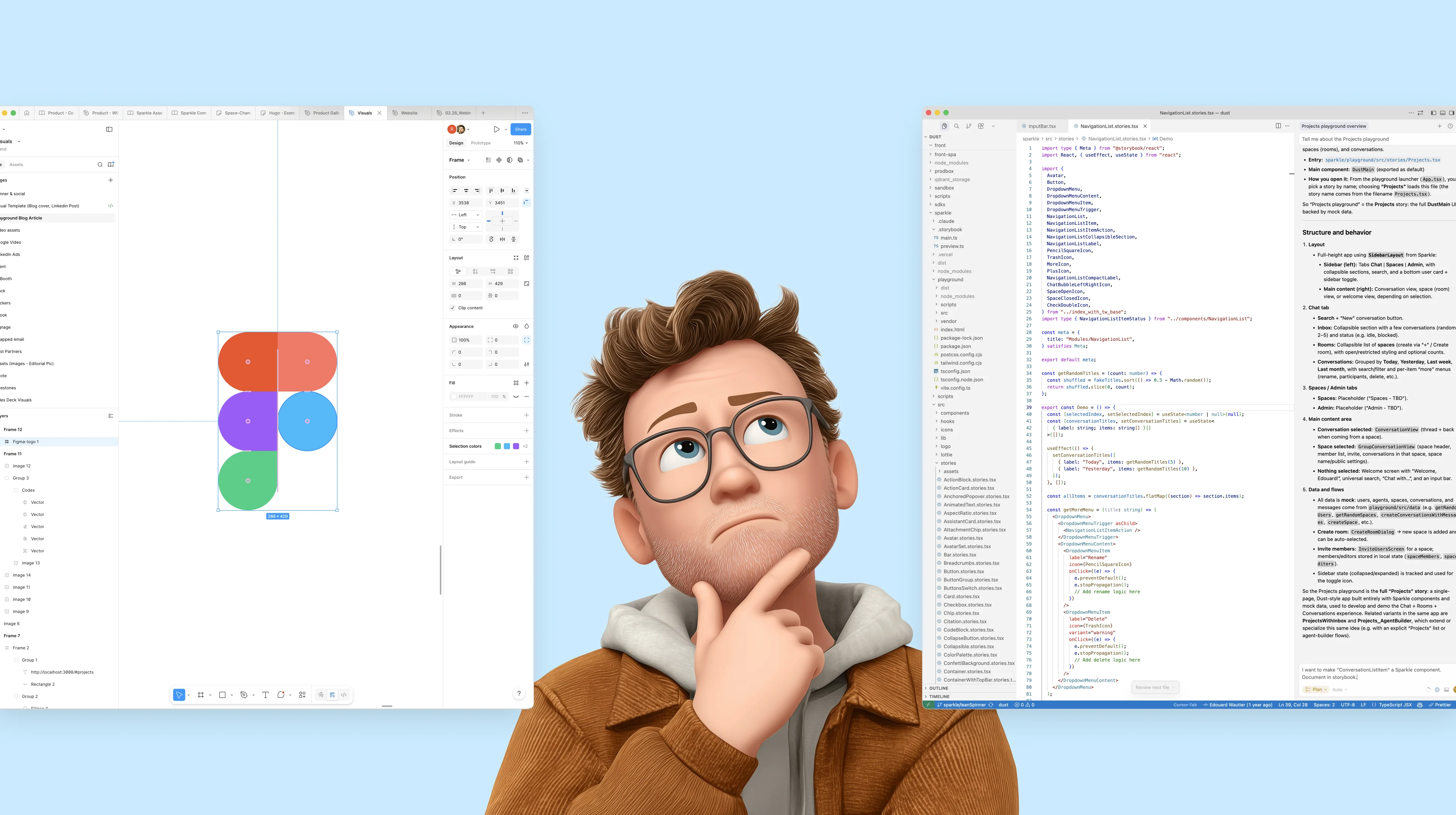
A practical guide to designing with code in 2026
Someone drops a link in a thread — not a deck, not a Figma file — something you can click through, interact with. The conversation shifts from opinions to behavior. This keeps happening at Dust. We’ve been experimenting with making prototypes our default design artifact. The question driving us:
What should designers produce to help teams decide faster while raising the quality bar and reducing implementation waste?
We don’t have a final answer yet. This article is a field report: what we’ve tried so far, what seems to work, and what still feels unresolved.
Running a design project at Dust
I’ll describe the workflow in the order it usually happens. It’s not a rigid process — more a default path we’ve been trying.
From “thinking” to “making it real”
After the initial analysis and quick sketchbook phase, when I need to give the idea shape and pressure-test it, I don’t open Figma.
Create a playground
I open my development environment pull the latest version of our repo, and create a branch. Then I ask an agent to scaffold a new prototype, and I describe what I’m trying to make.
Iterate on behavior, not pictures
At this point I mostly care about trying the idea and seeing whether the interaction holds. I’ll build small flows, prototype the transitions, and sanity-check the parts that static screens often hide (state changes, error cases, motion, empty states, keyboard/navigation/accessibility basics).
I can very easily use realistic fake data. We’ve pre-generated a bunch of it (people profiles, pictures, names, emails, lists of files and folders, entire conversations…). If I need new ones, it’s a matter of seconds to generate them.
Everything runs in the browser, so I’m always looking at the experience at 1:1 scale — at user level. What I see is what user gets.
Use the design system by default, bend it when needed
During that phase, I don’t optimize for visual polish. I start with behavior and structure; the styling can catch up once the flow holds. The agent naturally builds on our design system (Sparkle), so the prototype reuses our components and tokens from the start.
If I need a new component or a tweak, I’ll do it on the branch — and only later decide what should become “real” design-system work vs. what was just local exploration.
Share early
Sharing is simple: I push the branch to GitHub and open a PR. My prototype auto-deploys, I can share an easy-to-open URL. GitHub is a natural environment for engineers, so feedback happens where the work lives.
Converge: reduce the diff
As iteration loops tightens and I get closer to something final, I start paying attention to:
- introducing just the right new component (and no more)
- making the smallest necessary change in Sparkle
- cleaning up accidental modifications
Handoff through the PR
Engineering handoff is straightforward: it happens through the PR.
I can point to what changed, what needs refining in the design system, and what is “prototype-only”. Engineers can reuse components directly, and use the prototype code as reference — because it runs on the same stack, with the same components.
Shortcomings
Before going into the setup, a few honest trade-offs we’ve run into:
- It’s still a sandbox. Unless we simulate it, it won’t naturally reproduce real latency, loading states, and backend weirdness.
- Feedback isn’t perfectly smooth. Vercel’s preview comments can help, but it’s been a bit flaky for us — screenshots + Slack are still the default.
- You occasionally pay the “code tax.” Most of the time this is faster than mockups, but occasionally you lose 30 minutes to a silly environment or tooling issue. Quite often, the prototype reveals the brief itself is still fuzzy — or that what we asked for isn’t feasible yet.
- It can invite premature polish. Because it looks real quickly, it’s easy to get dragged into nitpicks before the core interaction is settled.
- Hand-off clarity. It’s not always clear with engineers what they should directly re-use and what is prototyping.
The Setup
Dust runs on React, in a monorepo. Our design system (Sparkle) lives there too. Sparkle gives us two complementary places to work:
- Storybook for building and documenting components in isolation (variants, interactions, visual regression). It’s our component catalog.
- Playground is just a small Vite app nested inside Sparkle. It is a fast development server, it starts quickly, refreshes instantly as you edit, and stays lightweight.
The key point: both environments consume the same Sparkle source and Tailwind styles, so prototypes reuse real components and tokens by default.
Vercel for easy sharing
Vercel is a cloud platform that automatically deploys a GitHub branch as a shareable, live URL. For us, if the branch name contains
sparkle, Vercel auto-deploys both Storybook and the Playground and posts preview links in the PR — so sharing a runnable prototype is basically instant.One thing we haven’t tried yet: bringing real AI interactions into prototypes — streaming responses, agent behavior, conversational flows. Since Dust is an AI product, that’s a meaningful gap in our current setup. Vercel’s serverless functions could be a way to close it.
Coding tools
The beauty of this setup is that almost any AI coding tool will work. Claude Code, Antigravity, Codex . My tool of choice is often Cursor (for prototyping), but I move between them freely.
Notable gap: Lovable, which I heavily use and love for personal projects, isn’t a good match here — yet. For good simplicity reasons, it doesn’t handle repos as complex as ours or support the kind of professional-grade git collaboration we need.
What about Figma?
Don’t believe the catchy “RIP Figma” headlines. Figma hasn’t gone anywhere for us. We still use it upstream for mapping journeys, sketching quick ideas, and running brainstorms; downstream for managing visual assets and illustrations.
It’s taken a back seat in the middle: the step where you translate an idea into something concrete enough to evaluate. It helps that we never treated Figma as the source of truth for product or design system — truth is in the code. That’s a huge potential efficiency win when you flip to prototyping first.
A note on Figma Make: we haven’t been convinced by it compared to our own setup. Make is designed to generate code from mockups — which makes sense if mockups are your starting point. But if you flip to prototyping first, it doesn’t play well with an existing codebase.
The question underneath: should designers work in code?
Behind all the talking is the old debate of technical literacy in design. Should designers code? To what extent? Here’s my current take.
Belief #1 — Technical literacy is a design skill
I’m an industrial designer by training. In industrial design, understanding your materials is not a “nice to have”. If you don’t know how plastic bends, how aluminum behaves, or what manufacturing constraints do to a shape, you design objects that look right in 3D but fail in the hand.
Digital products are built with a material too: code. Technical literacy does not necessarily mean coding, but it means understanding how a digital system behaves and why.
Belief #2 — Designers working in code can improve quality and speed
Having designers work in code can be a real accelerator: tighter feedback loops, fewer handoffs, and less drift between what we design and what ships.
The catch is that this approach doesn’t scale by default. As organizations grow, the product surface expands, the codebase gets more complex, and the friction adds up. Recruiting designers who can both design and contribute significantly to production code — at scale — is hard to rely on as a core strategy.
Belief #3 — “Designers coding” cost-benefit has flipped
AI is changing the game on three axes:
- It’s easier.The “need to know” is shrinking and the cost of learning is going down fast.
- It’s faster.What used to take hours takes minutes. Once you have a runnable baseline, you can explore variations, states, and interactions at a speed that makes static mockups feel like overhead.
- It’s more powerful.The amount you can build with limited ability is remarkable — full interaction flows, working components, realistic prototypes.
I won’t pretend this requires zero knowledge. It doesn’t. But the cost-benefit has flipped: what you can do, and how fast you can do it, makes it hard to justify not putting in the effort to acquire the minimal skills required.
What does the future look like?
The next step for us is bridging the gap between prototypes and implementation. Today, designers rarely make changes directly in production code . Running a local instance of Dust is heavy, and pushing to a test environment is too slow for tight iteration.
This is changing extremely fast. More on this soon — but if you’re curious, here’s a technical preview of what we’re working on.
Closing
I keep coming back to a longer historical loop. Design as a distinct practice really took shape when mass production separated roles that used to live in a single person: the craftsperson who could think, make, and sell the object. Once manufacturing scaled beyond the workshop and those roles split, you needed something that could travel between people and disciplines.
That something wasn’t just a pretty shape. It was a dessein: a drawing, a plan, a set of intentions constrained by technical reality. In other words: a model of the object, expressed in a format compatible with production.
Digital product design inherited that logic. Static mockups, specs, flows — they’re all versions of the same move: translating intent into a plan that others can implement.
But when coding (and prototyping) becomes more accessible we’re not only getting faster at producing plans. We’re regaining the ability to model directly.
More like clay than drafting: you shape, you test, you feel, you adjust — with an instantaneous feedback loop. The artifact is no longer a description of the thing. It starts to become the thing, or at least a runnable slice of it.
Design is moving from planning experiences to modeling them — closer to reality, earlier, and with tighter feedback loops.